How to Keep AI Characters Consistent Across Images and Videos
Maybe you’ve given an AI image generator a prompt—“make a neon-skinned raccoon detective, cyberpunk style”—and got lucky with something brilliant. Then you ask for “the same raccoon, sipping coffee in a rainy city,” and the AI delivers…a blue cat with aviators. Consistent character? Not quite. Whether you’re creating a branded mascot, an animated explainer, or a whole digital comic, character consistency is the backbone of attention, story and trust. But how to keep AI characters consistent as you scale from single images to whole video projects involves much more than just repeating a description.
Define the Character’s Essential Visual Features
Character design is a lot like casting an actor: there are traits you can tweak from scene to scene, and then there are the absolute “must-haves” that define their identity. With AI, these essentials aren’t always obvious, because prompts can be interpreted loosely and models tend to wander. You need to be crystal clear about what makes your character, your character.
- Facial Structure: Is their jaw square or rounded? Large ears, narrow nose, specific eye shape or coloration? These are often more determinative than hairstyle or costume.
- Signature Marks: Freckles, scars, cybernetic implants, tattoos, or distinctive color patches. They should remain in the same place and appearance.
- Body Proportions: Height, bulk, limb length and silhouette stand out even more in sequential images or video.
- Recurring Accessories: Glasses, necklaces or hats can act as visual anchors—but should never be the sole identifier.
Ask yourself: if the setting, clothes and lighting changed, what must remain for someone (or an AI) to recognize this as “the same character”? For businesses building brand mascots or content creators working on comics and animations, this step is non-negotiable. Many digital artists now use Adobe Photoshop or image annotation tools to map and label these “core” features directly onto a character’s reference image for cross-checking later.
There’s a trade-off: the more unique and “weird” your anchor features, the harder it can be for today’s text-to-image AI models to reproduce them reliably. Overly complex details may melt into randomness between outputs. Often, it pays to focus on memorable shapes and a few distinctive traits instead of lengthy prompt descriptions packed with adjectives.
Build a Reusable Reference Sheet
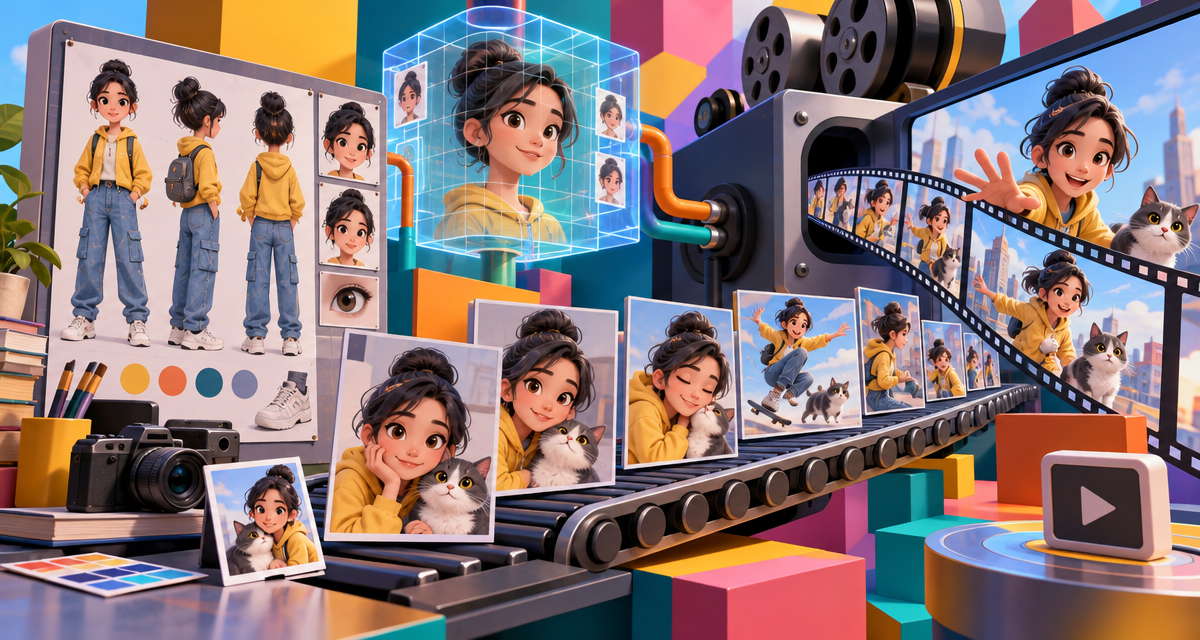
A reference sheet is your character’s visual identity passport. In an AI-assisted workflow, it’s not just a behind-the-scenes artist tool—it’s the primary “source of truth” for both human and machine. Think of it as structured data for people and pixels alike.
A strong character reference sheet includes:
- Turnarounds: Front, side, and back views. Helps AI and artists understand the 3D form.
- Close-ups of key features: eyes, distinctive markings, unique accessories.
- Color palette swatches: Specifying color values by hex/RGB reduces prompt drift (“blue fur” turning teal, then purple).
- Expressive poses: A sampling of typical facial expressions or gestures to set tone and personality.
- Written notes on what can (and cannot) change. E.g., “Always the same scar on the left cheek; eyeglasses are NOT optional.”
The workflow varies depending on whether you’re using Midjourney, Stable Diffusion or OpenAI tools, but most seasoned creators upload the reference sheet into the AI platform, or use “image prompt + text prompt” hybrid workflows.
Teams working on larger projects (animation studios, brands) often standardize their reference sheets and integrate them into asset management platforms like Dropbox or Notion for easy cross-department access. The cost is time and up-front labour—but by eliminating “whoops, the mascot changed hair color again,” you save even more down the pipeline.
Separate Identity From Wardrobe and Setting
One of the most common pitfalls: writers and marketers describe characters by their clothes (“the green-hooded girl,” “the unicorn with skateboard shoes”), not by their permanent features. This often leads AI to treat “clothes = character,” and change their facial structure, height or body shape when you swap a hoodie for a spacesuit.
To avoid this, structure your prompts—and your reference library—so that identity is always distinct from outfit and setting. How?
- Layer your references: Have a “base form” of your character, undressed or in neutral gear, as the primary anchor.
- Wardrobe and setting as modifiers: Maintain separate folders (digital or physical) for costume variations, backgrounds and props—not as core features.
- Consistent naming and file structure: Use clear labeling, e.g., “Char01_Base,” “Char01_Spacesuit,” “Char01_Formal,” so everyone (human or AI) pulls the right source.
This compartmentalization also empowers creative teams to refresh brand campaigns (“mascot in summer gear,” “holiday edition,” “sport avatar”) without triggering accidental drift in physiognomy or overall look. For social media creators making episodic content—like YouTube animators—the practice prevents character “mutations” from one video to the next.
A real-world pitfall? Automated video tools prone to “bleeding” style between shots if foreground and wardrobe aren’t clearly partitioned, leading to that uncanny feeling where your character seems to morph a little every scene.
Check Continuity Before Animating
Anyone who’s tried to line up frames for animation with AI-generated art knows the challenge: small shifts in eye shape, ear placement or limb proportion between images can make even the simplest video look like a digital fever dream. To combat this, systematic continuity checks are mandatory before pushing assets into animation software.
Smart workflow practices include:
- Side-by-side comparisons: Review sequential frames with reference overlays or flipbook-style tools to catch subtle drift.
- Use version control: Platforms such as Adobe Creative Cloud, Notion or Dropbox help track which version of a character asset is current and which may have wandered.
- Leverage AI feedback loops: Some newer AI tools support “prompt chaining” or guided fine-tuning that uses your previous asset as a hard constraint for the next image or frame.
- Manual audit checkpoints: Even with automation, have human eyes approve key frames for consistency—especially at the start and finish of scenes.
Iterating between AI generation and manual review is less glamorous than letting a model “just do its thing,” but it separates crisp, professional results from uncanny valley mishaps. The downside is slower throughput, but the benefit is worth it: no distracting glitches or continuity errors to break the audience’s suspension of disbelief or a brand’s trustworthiness.
Organise Approved Assets and Rejected Variations
Most creative disasters happen not because somebody failed to generate a beautiful asset, but because folders overflow with unlabeled, half-finished, or ambiguous versions. As character-driven AI workflows scale, digital asset management is the unsung hero of consistency.
A practical character asset library usually includes:
- Approved References: The “gold standard” for faces, bodies and outfits that every subsequent asset must match.
- Rejected or Variation Folders: Where you park the near misses (wonky proportions, off-brand color, mismatched features) so they don’t contaminate the workflow.
- Metadata Tags: Details like version number, artist/reviewer name, approval date and usage context (web, social, video, print) are added to files.
- Centralized Storage Platforms: Dropbox, Notion, or industry DAM platforms let teams collaborate globally and keep track of the latest approved versions.
Here’s a look at an effective digital asset sorting structure for character AI projects:
| Asset Type | Purpose | Storage Best Practice | Example File Label |
|---|---|---|---|
| Base Character Sheet | Anchor for all outputs | Locked, write-protected folder | Char01_Base_v1.png |
| Approved Variation | On-brand costume/scene change | Subfolder with clear labels | Char01_Formal_v2a.png |
| Work-in-Progress (WIP) | Review and feedback cycles | Time-stamped and owner tagged | Char01_Skateboard_WIP_June2024.png |
| Rejected Variations | Reference for “what not to approve” | Separate out of main asset workflow | Char01_Variant_Rejected.png |
In larger productions or with persistent AI assistants (like virtual influencers), this kind of asset control can make or break the brand. It’s the safeguard against accidental “feature creep,” untracked design shifts, and embarrassing public misfires due to a mismatched character showing up in your latest campaign.
Final Thoughts
Keeping AI characters visually consistent across images and videos calls for more than just good prompts or flashy models—it demands a blend of old-school character design discipline, new-school digital asset management, and a workflow that puts reference before randomness. The upside is huge: stronger story worlds, better audience recall, and fewer headaches on launch day. Get it right, and your AI-generated heroes, mascots or virtual agents will never need plastic surgery between episodes again.